
Meet the Network APIs Playground: Safely build, break, and learn
Published: January 14, 2026
A fast, zero-risk way to explore Network APIs with dynamic mock data, through API-first endpoints you control.
TL;DR
The Network APIs Playground lets you explore, prototype, and stress-test Network APIs in minutes without touching real networks or sensitive data.
- A fully mocked, stateful version of our Network APIs, with identical request/response models.
- An Admin Playground API to create up to 10 test phone numbers and precisely control their “network reality” (location, reachability, QoS, KYC, SIM swap, and more).
- Designed for learning, rapid prototyping, and reproducing real-world edge cases.
- No setup, no impact on live systems, no real subscriber data.
- Watch the short demo or jump straight in with the quick start below.
Introduction
Network APIs are opening up powerful telco capabilities (device reachability, quality on demand, number verification, fraud signals) to a much wider developer audience through simple, secure interfaces.
But getting started is rarely simple.
You need credentials, the right environment, a clear understanding of network concepts, and above all, confidence that you’re not going to break something or mishandle real subscriber data while you learn.
The Network APIs Playground is designed to remove that friction.
It provides an API-first, stateful mock of our Network APIs. You create test phone numbers, define their “network reality”, and then call endpoints that behave like a production network: same schemas, same validation rules, same domain logic. The only difference is that everything runs on dynamic, synthetic data that you fully control.
The result is a clean learning curve. You don’t learn a special testing interface or a fake abstraction. You learn the real APIs, practice real integration patterns, and explore both success and failure paths safely, long before you point your code at a live network.
What is the Playground?
- A family of mock endpoints that replicate the request/response shapes of our Network APIs.
- An Admin Playground API to:
- Create up to 10 phone numbers (per user/workspace),
- Configure each number’s state: location, reachability, QoS session, KYC result, SIM swap timestamps, error modes, and more,
- Reset or script scenarios to reproduce edge cases.
Because everything runs on mocked, stateful data, you can iterate safely: no real subscribers, no live network impact, and full control over success and failure paths.
Key features at a glance
- API-first workflow: no UI required: automate setup, state changes, and tests from your code,
- Stateful mocks: responses reflect the state you set on each number (not just static JSON),
- Drop-in facades: same request/response models as our Network APIs, so switching to real endpoints is straightforward,
- State-driven outcomes: drive positive/negative results by setting number state; no synthetic latency injection (yet 😊),
- Safe by design: entirely synthetic data.
Who is it for?
- Backend engineers validating integration code and error handling,
- Mobile/frontend developers exploring flows before wiring real credentials,
- Solution architects mapping use cases to capabilities,
- QA teams building deterministic test suites and CI checks,
- Anyone curious about what Network APIs can do.
Getting started
Think of onboarding as two short chapters:
- In the first, you grab credentials for the mock environment and open the Admin Playground API. In a single call, you create your personal cast of up to 10 phone numbers.
- In the second chapter, you give each of those numbers a backstory: where they are, whether they’re reachable, whether they recently had a SIM swap, and even whether a QoS session is active or expired.
From there, you switch over to the mock Network APIs and call them as if you were in a real environment; the only difference is that the responses are driven by the state you just set.
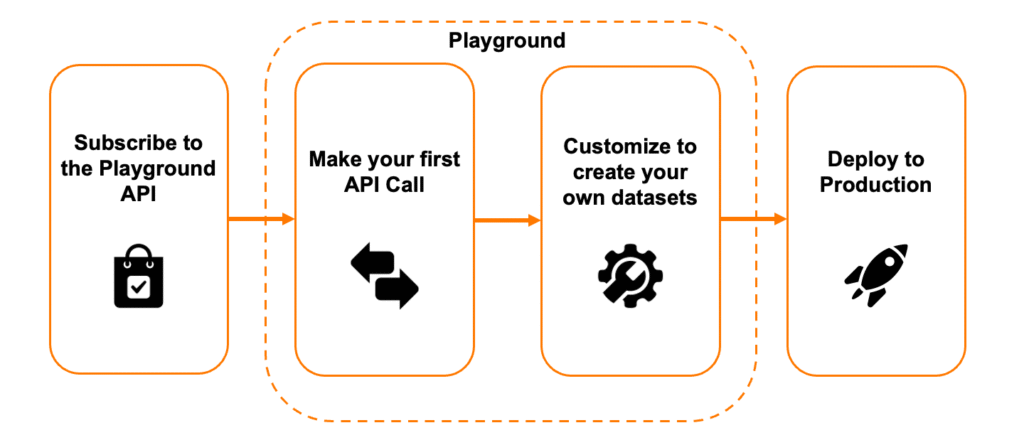
This flow keeps your mental model clean. You don’t learn a special testing interface; you learn the real interface. You’ll craft the same requests you’ll use in production, see the same shapes in responses, and practice the same error handling, only with data you control and zero risk to live systems.
Create test numbers and configure state
Start by registering up to 10 test numbers for your workspace. Once you have your set, you patch each number’s state.
curl --request POST \
--url https://api.orange.com/camara/playground/admin/v1.0/action \
--header 'authorization: Bearer YOUR_ADMIN_TOKEN' \
--header 'content-type: application/json' \
--data '{
"action": "CREATE",
"phoneNumber": "+33612345678"
}'Code language: PHP (php)Want a subscriber “in Paris, with a data connection, reachable, and a recent SIM swap”? Say it in the Admin payload. Prefer a high-confidence KYC for one number and an ambiguous one for another? Set it and move on.
curl --request POST \
--url https://api.orange.com/camara/playground/admin/v1.0/action \
--header 'authorization: Bearer YOUR_ADMIN_TOKEN' \
--header 'content-type: application/json' \
--data '{
"action": "UPDATE",
"phoneNumber": "+33612345678",
"data": {
"location": {
"lastLocationTime": "2026-01-13T10:00:00.000Z",
"available": true,
"latitude": 48.864716,
"longitude": 2.349014,
"radius": 800
},
"reachability": {
"lastStatusTime": "2026-01-13T10:00:00.000Z",
"reachabilityStatus": "CONNECTED_DATA"
},
"simSwap": {
"latestSimChange": "2026-01-10T10:00:00.000Z"
}
}
}'Code language: PHP (php)That state is now the source of truth for how the mock endpoints will behave.
For example, after you seed reachability and location, a call to the mock Device Reachability endpoint will reflect exactly what you configured. If you activate a QoD session, it will show up as active, complete with an expiry timestamp and you can register a webhook callback to receive updates. The goal is simple: your code gets realistic responses and lifecycles without touching actual network resources.
curl --request POST \
--url https://api.orange.com/camara/playground/api/device-reachability-status/v0.6/retrieve \
--header 'authorization: Bearer YOUR_TOKEN' \
--header 'content-type: application/json' \
--data '{
"device": {
"phoneNumber": "+33612345678"
}
}'Code language: PHP (php){
"lastStatusTime": "2026-01-13T10:00:00.000Z",
"reachabilityStatus": "CONNECTED_DATA"
}Code language: JSON / JSON with Comments (json)Note: Want an even faster path? Use our open-source Bruno collection to run the same flow with pre-organized requests. Open it, set your base URL, auth token, and the MSISDNs you want to register, then execute the Admin calls to create and seed state before hitting the mock endpoints. It’s the quickest way to validate your integration end-to-end, and it’s easy to version with your code.
Designing for failure (realistically, on purpose)
While the Playground doesn’t yet let you dial in artificial latency or force server-side errors on command, it does mirror production behavior where it matters most: validation and domain logic.
If you send an invalid payload (wrong field types, malformed values, or missing mandatory parameters), the mock endpoints return the same 4xx responses and error bodies you’d see in production. And because you control each number’s state with the Admin API, you can engineer legitimate negative outcomes: an unreachable device, an expired QoS session, or a recent SIM swap that elevates risk.
The result is a realistic feedback loop for your error handling without touching real subscribers. If you need to test client-side timeouts or rate limiting, pair it with your own proxy or chaos tooling locally; your request/response shapes will remain identical when you graduate to live environments.
What you’ll learn by actually using it
As you move from Admin to the mock endpoints, you’ll naturally absorb the request/response models, the headers that matter, and the typical status codes and error shapes. You’ll learn how QoS sessions are created and torn down, how reachability updates over time, and how to interpret fraud-related signals such as SIM swap and KYC. Most importantly, you’ll build muscle memory for idempotency, retries with backoff, and structured logging with correlation IDs: habits that pay off the moment you point your client at real infrastructure.
From mock to real, minus the drama
When your flows are working as expected, moving from the Playground to production is intentionally uneventful. Swap the base URL, update your credentials, and keep your request and response handling exactly the same.
The Admin Playground API exists only in the mock environment (it’s your test data workbench, not a production control plane), but everything you’ve learned about payloads, headers, status codes, and error handling carries over directly.
The Playground doesn’t aim to simulate every production characteristic. Instead, it focuses on what matters most for developers: realistic schemas, validation, and domain behavior. Rate limits, SLAs, latency, and country-specific nuances remain the domain of production documentation and live environments.
Tooling is evolving alongside the APIs: in addition to the open-source Bruno collection, we’re expanding support for other ecosystems such as Postman, Hurl, and additional formats, so teams can plug the Playground naturally into their existing workflows: from local exploration to CI pipelines.
Grab your mock credentials, spin up a few test numbers, and see how quickly you can go from a first request to resilient client code.
And if there’s a specific scenario or tooling format you rely on, tell us. Your feedback directly shapes what the Playground becomes next.
About the author

Anthony Nevo,
Senior Software Engineer,
@Orange LiveNet
Passionate about code and user experience, Anthony is dedicated to helping developers seamlessly integrate Network APIs into their projects.
Talk to sales
Do you want to reach directly for any additional details or follow-up?
Find out more

Playground documentation
Enables developers to prototype and validate various use cases in real-time, without impacting live systems.



Bruno collection on GitHub
Complete API client collection with authentication flows and all API endpoints – move fast without taking risks.

Recorded talk with a live demo (17 minutes)
Provides a short overview of the Network APIs, and how to use the playground.