API Change and Testing Guide for M2M Authentication
Published: February 10, 2026
This document explains the upcoming changes related to the M2M (Machine-to-Machine) authentication process, clarifies how to identify if your API is impacted, and provides instructions for testing and integrating these changes.
How do I know if this change impacts my API?
- Scope: The change only concerns M2M (Machine-to-Machine) authentication, which is used when an application authenticates itself without a specific user involved.
- Impact: All offers using M2M authentication, regardless of how long they have been in place, are affected.
- Current Usage: If your application retrieves the token via a POST request to /oauth/v3/token and simply reads the token attribute from the response, your API is not impacted.
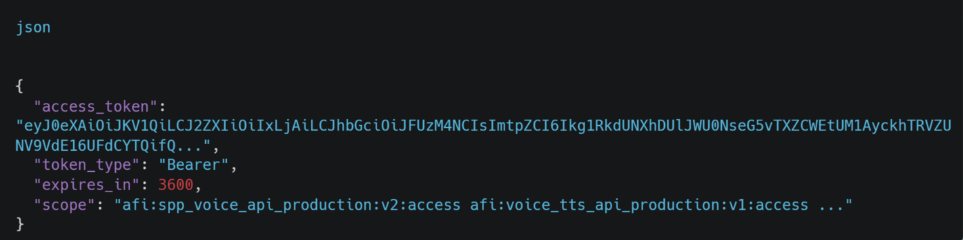
- Potential Impact: If your application retrieves all three attributes in the response body or verifies their order, and your logic depends on these attributes, then your implementation will be affected because the response will now include scope as a fourth attribute.
What are the changes?
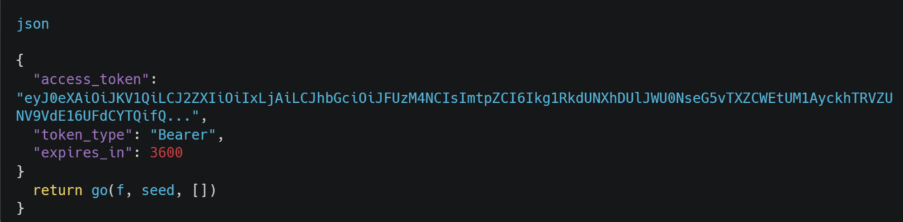
- Response Structure: The token body response will now include an additional attribute called scope.
- Current Response Example:
- New Response Example:
How do I integrate these changes into my API?
- Use your existing credentials:
No change is needed in your credentials or client setup.
- Modify your response parsing:
- If your application processes all three attributes, update your code to handle the additional scope attribute.
- Ensure your logic does not depend on the order of attributes, as the response now explicitly labels each attribute.
- Test:
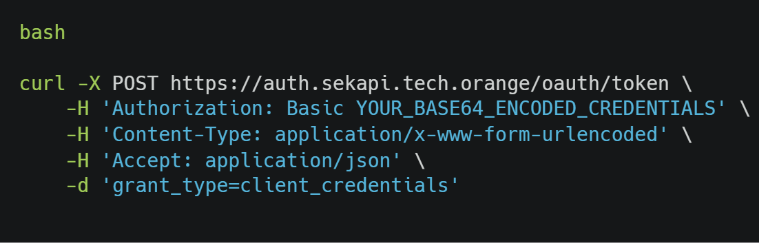
Use the same POST request method, using the test URL, to request tokens and verify the response structure.
How do I test the change?
- Make a POST request to the test URL:
- Verify the response:
Confirm that the response contains the scope attribute along with access_token, token_type, and expires_in.
- Check your parsing logic:
Ensure your application correctly extracts and processes the scope attribute if needed.
- Perform tests in a staging environment:
Run multiple tests to verify that your application handles the new response structure correctly.
- Monitor for issues:
After deployment, monitor your system for any parsing errors or unexpected behaviors.