Device Reachability Status
Query whether a mobile device is currently reachable via data and/or SMS so your application can choose the right channel and timing before sending a message or triggering a workflow.

Make communication attempts smarter with reachability-aware decisions

Enabling better communication or service management decisions based on real-time device availability
Many digital journeys fail for avoidable reasons: the user device has no data session, SMS is temporarily unavailable, or the device is simply offline. Device Reachability Status gives you a standardized way to ask the network: is this device reachable right now via data, via SMS, or not connected?
The Device Reachability Status API allows to query the connectivity status of a mobile device (data connected, SMS connected or not connected). The requester provides one mobile device identifier (MSISDN, IP or external identifier) and gets a response with the device connectivity status.
With that signal, your systems can pick the most effective channel (data push vs SMS), reduce pointless retries, and improve customer experience in time-sensitive workflows like support, delivery coordination, security notifications, and critical operations.
CAMARA compliant API
The CAMARA Device Reachability Status API lets you query whether a mobile device is currently reachable via data, SMS, or not reachable, based on the network’s view of connectivity. This helps product and operations teams avoid blind retries, reduce unnecessary traffic, and take the right next action when a customer cannot be contacted.
Benefits

Real-time connectivity monitoring
Provides instant updates on whether a device is reachable via SMS or data, enabling quick diagnostics and reliable communication

Improved user experience
Allows businesses to verify device reachability before attempting contact, increasing message delivery success and customer satisfaction

Optimized network usage
Ensures messages are sent only when devices are reachable, reducing failed attempts, unnecessary retries, and enhancing overall network efficiency
Use cases
Customer communications orchestration
choose the best channel (data vs SMS) before sending time-sensitive updates (deliveries, appointment reminders, service notifications).
Contact-center efficiency
reduce avoidable troubleshooting by confirming whether the device is currently reachable.
Fraud / risk workflows
when combined with other signals, reduce unnecessary authentication attempts when the device is not reachable (note: reachability alone is not an identity proof)
IoT/field service operations
decide whether to push remote actions now or schedule them later based on reachability state.
Test and explore our APIs with API Playground
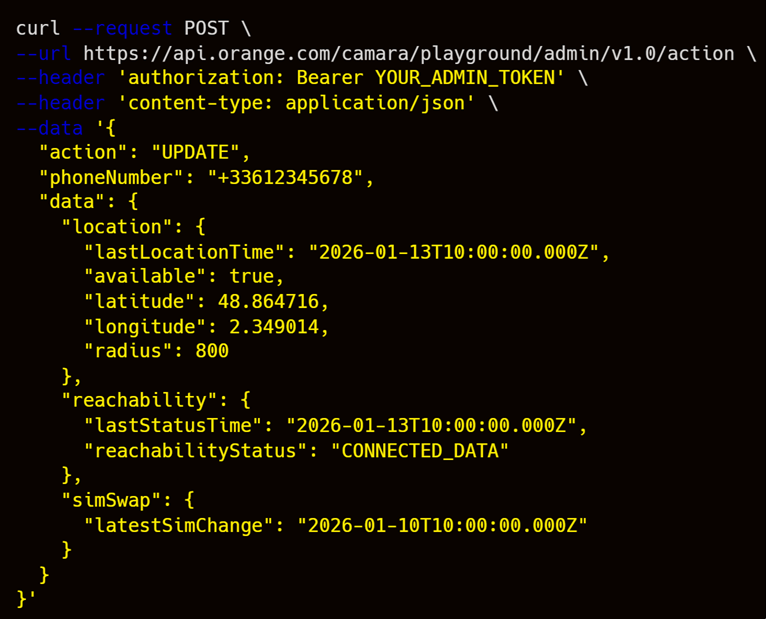
Use the Network APIs Playground to prototype with Device Reachability Status in a safe environment. The Playground is designed for experimentation: validate your functional flow, integrate once, and iterate quickly without impacting production systems.
Get started today and bring your projects to life!
Frequently Asked Questions
Related APIs

Device Location Retrieval
Retrieve the geographical area position of a mobile device.

Device Location Verification
Verify if a mobile device is within a geographical area.